
Website build: coding with Claude
Tim Girling-Butcher • November 18, 2025
I’ve been working with my organisation's website — built with Sanity and React/Next.js — for several years, but I hadn’t had many opportunities to properly familiarise myself with the tech stack. With the site live, the risks of breaking something or simply embarrassing myself were high.
So I decided to build a fully-functional platform and learn by struggling through the real work: wiring up schemas, GROQ queries, dynamic routing, image pipelines, and all the deployment oddities. Hands-on experimentation is the main way I actually learn and retain information, and I wanted to understand how Next.js 16 handles server components, how Sanity’s structure builder behaves once you push it beyond the basics, and how the whole stack holds up once real content starts moving through it.
At the same time, I used the project as a chance to experiment with Claude Code as a kind of pair-programmer. Instead of treating AI as a shortcut, I approached it as a debugging partner and pattern-spotter - giving it discrete tasks, watching how it refactored or reasoned about the code, and testing where it genuinely improved my workflow versus where it wandered into rabbit holes or simply hit a wall. It became a way to learn both the stack (its knowledge of this ecosystem is genuinely encyclopaedic) and the practical limits of AI-assisted development at the same time.
Being completely new to this setup, the learning curve was steep. I quickly found myself leaning heavily on Claude to design solutions and troubleshoot roadblocks. Before long, I was surprised by how reliably it could untangle issues, and that reliability meant the pace of work accelerated far faster than it would have if I’d been learning everything unaided.
Before unpacking the role AI played in the build - and how well it actually performed - it’s worth first outlining the core modules I developed: the components that now form the site’s framework and underpin most of its functionality.
Modules
There were a range of modules I wanted to develop and utilise. Listed below as a reference and in no particular order.
Hero video
The Hero Section (see above) is the full-screen intro block used for big, cinematic openings. It supports high-quality video backgrounds (H.265, WebM, H.264, full-back image or a direct URL) with an optional poster image, or a simple gradient fallback when no video is provided. An adjustable overlay keeps text readable, while the title and subtitle are centred and fully driven by Sanity. It’s a lightweight, flexible way to create bold, immersive page headers.
Photo gallery
PhotoSwipe is the image-viewer layer that powers all of my gallery and pop-up interactions. It gives the site a fast, touch-native way to browse high-resolution images, handling pinch-zoom, smooth panning, swipe navigation and responsive scaling without adding unnecessary bulk. Unlike many gallery libraries, it doesn’t force a specific layout or markup structure, which means I can design my own grid components and use PhotoSwipe purely for the viewing experience. This keeps the visual design flexible while still delivering a polished, app-like feel when a user taps into an image.
PhotoSwipe also integrates cleanly with Next.js and plays well with the Sanity image pipeline. Each gallery pulls in structured image data — source, alt text, aspect ratio, crop, hotspot — and hands it off to a lightweight React wrapper that initialises the viewer only when needed. That lets me lazy-load both images and the PhotoSwipe module itself, keeping pages fast and reducing visual shift. The result is a self-contained module that gives me complete control over presentation while ensuring users get a smooth, intuitive way to explore detailed visual content.

Kookaburra

Man crossing a river

Kioloa
Parallax
The Parallax Section is a flexible hero block that lets me place text over either an image or video background with a smooth scroll or scale-based parallax effect. It uses lightweight, GPU-accelerated transforms to keep motion fluid, and supports multiple layout options — height, text alignment, overlays, gradients, and Sanity hotspots — so the same module can be reused across very different page types.
Content is fully driven by Sanity: titles, subtitles, and rich text flow into a responsive layout that adapts to mobile and desktop. Backgrounds can be high-res images or multi-format videos, and all the scroll logic is handled automatically. It’s a self-contained way to create atmospheric, cinematic sections without custom coding each time.
Paralax
A subtitle field
Body text for writing general copy.
Text block
The Text Section is a simple, flexible content block for long-form writing. It renders Portable Text from Sanity using shared text components and supports adjustable width, alignment, spacing, and optional colour inversion for light-on-dark or dark-on-light layouts. It’s the building block for clean, readable content without custom styling each time. it includes:
Code block
export default function TextSection({ section }: { section: any }) {
  const maxWidthClasses = {
    small: 'max-w-2xl',
    medium: 'max-w-3xl',
    large: 'max-w-4xl',
    full: 'max-w-full',
  }
Table
This module lets a user paste in Excel data and have it automatically lay out as a table. Sanity doesn’t offer an easy native solution for tables, so getting this working was genuinely tricky.
| Item | Make | Model | Description |
|---|---|---|---|
| Locator | Quuppa | LD6L | Ceiling Locator |
| Locator | Quuppa | LD6L | Ceiling Locator |
| Locator | Quuppa | LD6L | Ceiling Locator |
| Locator | Quuppa | LD6L | Ceiling Locator |
| Locator | Quuppa | LD6L | Ceiling Locator |
| Locator | Quuppa | LD6L | Ceiling Locator |
Image with caption
A standard image block showing title, description and credit, with the full gallery viewer option.

Image with text wrap

The Image with Text Wrap block lets me place an image directly inside a text flow, with the text naturally wrapping around it. It’s designed for more editorial layouts where images need to sit within a narrative rather than above or below it. The block supports left or right alignment, responsive behaviour, and full Sanity-driven image data (including crops and hotspots), so it scales cleanly across devices. It gives longer articles a more magazine-like feel while keeping the layout lightweight and flexible.
Image inline
A straight image drop-in with no caption or credit

Pull quote
This is a pull quote. They are great for doing things like pulling out words that draw attention and break up the flow.
— This is the citation credit with a footnote.
iframe
A flexible embed block for anything external - SoundCloud, Google Maps, YouTube/Vimeo, widgets, calendars, forms. It includes controls for height, width, aspect ratio, scrolling, border radius, captions, and fullscreen toggling, so it feels integrated instead of tacked on.
Scroll Sequence
The Scroll Sequence module brings motion into the page narrative by transforming an animation - output as a series of still images - into a smooth, scroll-controlled animation. As visitors move down the page, their scrolling directly determines which frame is displayed, producing a video-like effect without a traditional player. The module renders onto a canvas for performance, progressively loads frames to reduce initial weight, and supports lazy loading to improve perceived responsiveness.
Built with flexibility in mind, the module supports externally hosted image sequences. I initially attempted to achieve this within Sanity, but the complexity and limitations of managing 200+ frames through the Studio UI made it impractical. The module can also render every second or third frame to reduce overhead when full-sequence fidelity isn’t required. Captions can be triggered at specific frame points, ensuring key information, explanations, or feature highlights align cleanly with visual transitions. Layout options allow the animation to be pinned left or right on desktop, fill the viewport, or switch to alternate image sets for mobile devices.
It also respects reduced-motion preferences, maintaining accessibility while preserving clarity and visual interest. The result is a highly configurable, lightweight module that enables immersive, interactive storytelling — from product reveals and process demonstrations to architectural walkthroughs and rich scrollytelling experiences. The example below is a concept for the Hyde Park Barracks.
Accordian
The Accordion module is designed for content that works best when broken into expandable sections — FAQs, project notes, technical details, or anything that benefits from a cleaner, more compact layout. Each accordion panel can contain full Portable Text and supports embedded modules like Image with Text Wrap, tables, and other rich content blocks, allowing me to reuse existing components rather than creating custom layouts for every case. It keeps dense information organised and scannable, while still giving me the flexibility to include more complex content when needed.
3D model viewer
This viewer brings in models from Pedestal (where MHNSW hosts its 3D models) and overlays a custom UI that is better suited to the website style. It triggers some of the options available through the platform via a custom UI, but rather than cluttering this interface, the user can follow a link to the pedestal platform for all options.
3D model gallery
A way of bringing in models into a gallery with custom titles and images. This opens into a full window view with the same controls as the model viewer.
Contact form
A form to drop in if people want to get in touch
A contact form
Call out for what ever reason someone might have to get in touch.
Video block
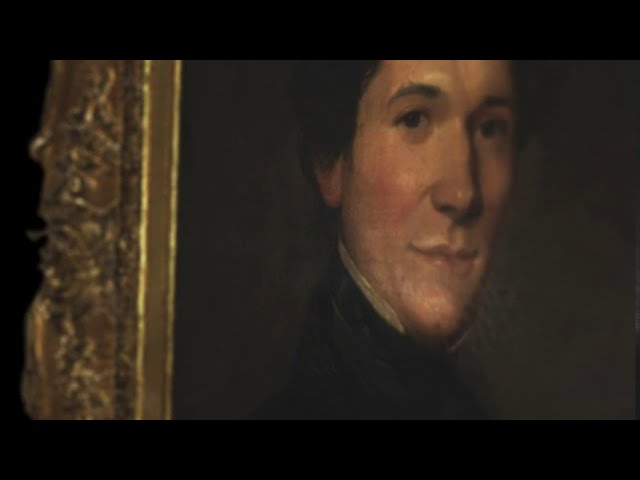
The video block gives me a simple, reliable way to drop in a video. It supports YouTube and Vimeo links and automatically handles the thumbnail, aspect ratio, and responsive sizing. The initial controls are lightweight so it feels like part of the site rather than a bolted-on player. One issue I had to resolve was a fallback for iOS to native YouTube player on load (iOS was forcing a double play due to autoplay restrictions). This video is an animation of a 3D model created of a framed portrait of an ancestor of mine.
Video Gallery
A way to bring multiple videos into a gallery. The description appears over the hero video once selected. Like the video embed, the standard YouTube controls appear on iOS devices due to Apple autoplay controls.

Beach
Highlights block
The Highlights block is a flexible grid of cards designed to surface other content on the site. It can pull in items automatically - based on tags, selected pages, projects or posts - or you can build cards manually with custom titles, icons and URLs, including external links. It’s a simple way to point readers towards related work, further reading or featured material, with the option to send them through to a dedicated page if they want to dive deeper.
Highlights
Read more →
Uncertain Intelligence: A Beginning or an End?
A reflection on Al's evolution - from Turing's vision to today's generative systems — exploring how learning machines mirror, challenge, and redefine humanity.

If the past is just a dataset, it can be re-weighted
How AI's ability to re-weight our collective history and private memory may create a radical, terrifying, and beautiful possibility: the end of fixed history.

The Age of 'Hacking Humans': Harari on AI and the End of Free Will
Throughout history, leaders have sought new ways to exert influence and control. In Nexus, Yuval Noah Harari explores how AI could shift surveillance from passive monitoring to predictive behavioural control, potentially enabling digital dictatorships unless strong democratic safeguards are put in place now.
Verdict on Claude?
Claude Code ended up exceeding my expectations. It made light work of the things I’d normally grind through - everything from getting Sanity running with Nginx to building and refining the deployment scripts. It handled model scaffolding, styling tweaks, and custom components with a precision that made the whole process feel lighter. Often I’d be stuck on something fiddly or tedious, and throw to Claude, and it would be untangled it in minutes.
Where it struggled was with genuinely complex problems - especially when I collapsed my staging and production environments onto a single server (while cursing myself for not doing that from the start). Its token limits meant it couldn’t hold a reliable memory of what had been running where, which created small but maddeningly time-consuming issues I had to sort out manually. But even with those quirks, the overall experience was remarkable. Its speed and reliability made such a difference that it’s now woven into my workflow - not as a shortcut, but as a genuinely capable second brain.
I plan to continue trialling the development of new modules and refining the platform, and based on my overwhelmingly positive experience with Claude Code so far, I expect it to be far more useful, stable, and capable than I initially anticipated.